RPA tools (Robotic Process Automation) are great solutions for automating boring, expensive, and repetitive workflows. RPA is designed to follow a pattern of user interactions and can free up valuable human resources by allowing software to perform repetitive tasks related to business processes. RPA tools provide the possibility for organizations to build a virtual workforce that works around the clock and continuously performs tasks without any human intervention.
Basically, RPA tools consist of 3 basic components: Designer, Orchestrator and Robot.
The Designer (also Studio) is used to create and design automated processes.
The Orchestrator is the brain of a RPA solution. It coordinates the execution of the automated processes based on user input or periodically. It also takes care about the management of the robots, which are part of the topology of an RPA platform.
The Robot are software robots which actually execute and run the automated process.
Common Misunderstanding
When we talk about integrating RPA into existing set of tools, we mostly refer to the workflows and processes we aim to automate using RPA. This usually starts by identifying the workflows and processes where high amount of human effort and time is involved by executing repeatable tasks. These tasks are mostly performed on the frontend of a software, such as SAP, Outlook, Microsoft Dynamics, Salesforce, etc. This kind of integration is referring to the recognition capabilities of an RPA tool and not of being integration into an existing tool set.
The Need to integrate
Let us assume, we have an ITSM process, where employee open an internal ticket or service request when they need to order a new phone, laptop or any other asset required to do the job. Today this is completely manual. Once ticket is created and approved, someone need to place an order of the asset and interact manually with the ordering system. In order to integrate and benefit from RPA, the ITSM tool should be able to execute an automated Bot from the RPA platform as part of the ITSM workflow.
Once RPA is integrated into an ITSM workflow, the user will need to submit the ordering request/ticket. Once request/ticket is accepted, the manager / approver will approve or decline the request. If request is declined, ticket is updated as usual as part of the ITSM workflow. In case of approval, RPA bot(s) will be triggered, which will extract the employee information from the ITSM ticket such as job level, location & cost center and order the asset required by the employee. This will consist activities to login to the asset ordering tool place the order based on the job level of employee. Once order is placed, the billing need to be mapped to the correct cost location, as well as the correct employee location need to be added as delivery address. Once completed, a confirmation email is sent to the employee and his manager. After this the ITSM workflow is set to the next phase.
RPA is not only for business (users)
To integrate fully automated bot(s) as part of your existing tool chain, it should be possible to access and execute the bots using open interface (such as REST API, SDK, etc.) on the RPA platform (usually on the orchestrator). This is crucial to be able to integrate and scale RPA within an organization. When RPA tools are evaluated and implemented, they are not integrated in any of the existing tool chains, such as ITSM, DevOps, IT Operations, Asset Management, Development Eco System, etc. This is a mistake as RPA implementation gain on maturity, this aspect become more important to the overall automation initiatives.
RPA at enterprise level
On long term, RPA will not only be used to automate business processes and increase productivity — on the contrary: Existing tool chains will require the need to integrate and consume their own bots as part of accelerating automation and improvement. Therefor a cross consumption is unavoidable.
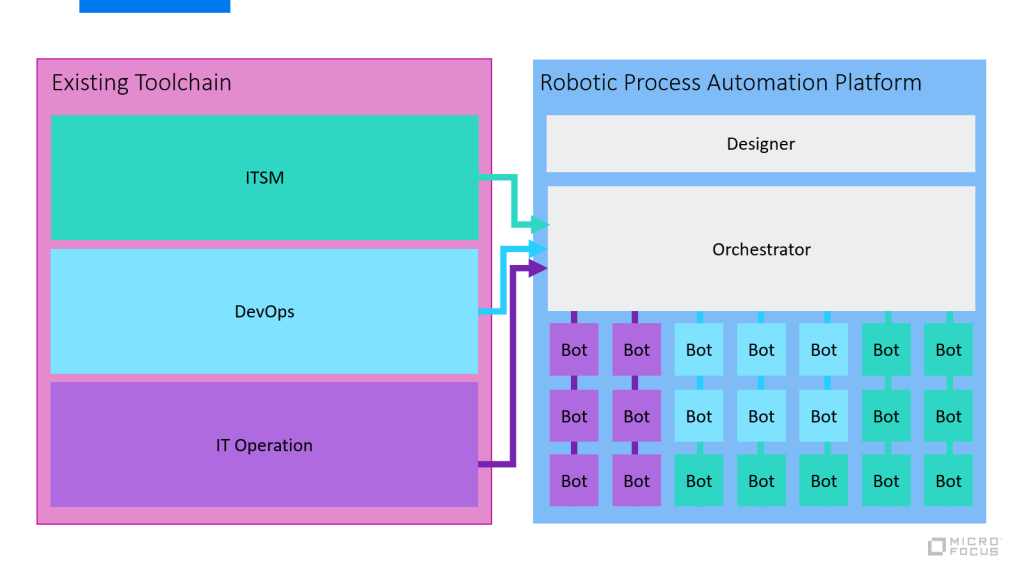
The following diagram shows an example how RPA evolves and integrates into the different tool chains.
For example, ITSM processes will manage, consume and integrate their bots into the ITSM workflow as needed, same goes for DevOps (preparation and post activities), IT Operations, Business, CRM, etc.
This allows a flexible consumption of RPA across department and teams and will not be isolated anymore. Share, reuse and collaboration will increase to productivity for RPA and build a automation community within an organization to support all aspects of automation (Testautomation, RPA, Service, IT Process, etc.).
Conclusion
The reason many organizations are failing adopting RPA solution is the fact that often it is evaluated as a point solution focusing on automation aspects only. When it comes to scaling bots by integrating into existing tool sets, it starts to get complicated as initial evaluation were made for a specific department and not completely validate for the enterprise need.
Micro Focus Robotic Process Automation gives you the power to build, secure, and scale automated processes, from legacy to modern, across the enterprise. Combining UI and API operations to centrally orchestrate the work of robots, Micro Focus RPA liberates human brainpower and ignites enterprise productivity. It provides an open REST API to integrate automated bots into your existing tool chain, independently from the tool sets in place.
Start your trial today: https://www.microfocus.com/en-us/products/robotic-process-automation/overview
Check out related articles: https://community.microfocus.com/t5/Application-Delivery-Management/How-can-Micro-Focus-RPA-accelerate-software-testing/ba-p/2778978




 Embrace-DevOps