Category: continuous testing

  • Containers are changing the world of testing

    Containers are changing the world of testing

    Introduction

    Development and deployment teams are increasingly adopting container technology to accelerate application delivery within continuous integration, deployment & delivery practices. These teams are using containers in the context of simplified application development/deployment (the image building process) and runtime environments (container execution).

    Interestingly enough, while testing teams are constantly being challenged to accelerate testing cycles and deliver more value with limited resources, the majority of testing teams are still playing catchup in the adoption of containers. As the saying goes, “A chain is only as strong as the weakest link”; testing teams should look to modernize the testing practices using container technology to keep pace with development teams. Containers bring significant value to the world of testing. The key benefits organizations can recognize by adopting containers in their enterprise testing strategy are:

    • Reducing the time and cost of building your testing environment
    • Reducing the Infra footprint and maintaining costs
    • Accelerating test execution times and reducing overall test cycle time
    • Improving resiliency

    Containers enable adoption of lean continuous testing practices

    Reducing the time and cost of building your automation tool environment

    Containers make it easy to deploy new versions of software into production quickly and to quickly roll back to a previous version on need basis. They also make it easier to implement strategies like blue/green deployments. Unfortunately, there is typically a manual process for setting up test automation tools, which slows the process and makes establishing test environments more error prone. Test automation tools and their dependency libraries & frameworks should be packaged into containers in order to remove the bottleneck and risk. Because the process of building containers can also be automated, it solves the challenge around manual and error prone testing tool deployments. Containers can also facilitate upgrading versions of the testing tools very easily by switching to newer version of the containerized testing tools.

    Reducing the Infra footprint and maintaining costs

    Instances of containerized apps use far less memory than virtual machines and can be packed more densely on their host hardware. All of this amounts to less spending on IT infra. In the testing context, one has to maintain the testing tool host machines even when the tests are not run. With containers, you don’t have to maintain the containers after the test execution is over which provides high savings in infra costs.  Containers are also good with resource utilization since they consume and share the underlying resources of the host machine providing cost savings to testing organization. One example here would be that of performance testing requiring large resources for short durations. Using containers to spinup ondemand load generators can bring cost savings to organizations. Another example is to use of virtualization of application services which again donot need to be available all the time. Containers can be dynamically spun up on demand with necessary virtual services and brought down after their usage can be another scenario of reducing infra maintenance cost.

    Accelerating test execution times and reducing overall test cycle time

    Containers are very easy to port and scale across multiple environments. If you had shorter testing timelines (which is almost always the case J) and wanted to run multiple tests at the same time, you will need multiple hosts with test automation tools installed and properly configured. In this traditional approach, scaling is a challenge as you cannot instantiate multiple instances of the host on the fly. With containers, organization can spin up multiple containers almost instantaneously and enable parallel execution of tests reducing test cycle time and overall delivery.

    Improving Resiliency

    Applications in containers will run the same, regardless of where they are deployed (multiple different operating systems and hardware platforms). If the host machine containing the test automation tool crashes for whatever reason, you have to either redo the manual steps to install the software again or restore backup causing delays to testing cycles and delivery. Test cycles can last for hours a crash that disrupts an nightly build test cycle can set the team back.  Using containers, after a fail is detected, a new environment can be constructed automatically and not cause a bottleneck. Creating and managing containers is super-fast and easy (starting and shutting down). It is also repetitive and if there are situations where the host crashes or unavailable, you can spin up new containers easily and pick up from where you left off without much delays in deploying a new host.

    Clearly in a continuous testing scenario, you can see there are significant benefits to deploying the test automation tools in containers just like the containerized applications as highlighted above.

    Micro Focus enables DevOps and Continuous testing using containers

    Commercial Automation tools have started to offer official container images for their respective automation tools in the registries. Clearly the organizations that adopt containers will have technology edge and will provide more value and bang for the buck. Enterprises should start to relook at their landscape to see how their test cycles are operating today and make containers part of the testing strategy. Docker is one of the popular container technology out there among the lot. Over the years, other container technologies (rkt , RedHat OpenShift, mesosphere ) are also maturing but docker is by far the largest in terms of container adoption.

    Micro Focus is a leader in lifecycle, functional and performance test automaton for 2 decades with its marquee tools like Octane, ALM, UFT Family and LoadRunner. Let’s see what Micro Focus has been offering from its stable of products from containers perspective.

    1. UFT One is an end to end (GUI, API testing), intelligent (Artificial Intelligence) test automation solution that covers applications in mainframes, web, desktop, mobile & packaged apps.
      • UFT One is available as docker container in Windows. It is also available as a hypervisor image. Having a docker image speeds up UFT One maintenance and test runs
      • What can you test in UFT One docker images:
        • UFT One’s Docker image enables you to run mobile tests in a Windows Docker environment, using UFT Mobile and UFT One automation scripts.
        • The UFT One 15.0.1 docker image also supports running API tests in a Windows Docker environment. Test applications in docker using docker activities under API testing of UFT One. Download docker image of your application and then start container on the fly to start testing and then shut it down at the end of the test. Reference: Run Docker Commands from UFT One
      • You could also use Jenkins to trigger the tests in UFT One docker containers
    2. UFT Developer embeds testing capabilities within IntelliJ, Eclipse and Visual Studio, allowing developers to shift testing left by creating tests at the same time they develop software applications. It supports common technologies, languages, IDEs, operating systems, source code management tools and continuous integration tools.
      • UFT Developer provides Docker images enabling you to run your tests in Docker containers.
      • UFT Developer docker container currently supports running all Web and mobile applications
      • There are 2 modes of executing scripts using UFT Developer: Standalone and Execution. In standalone mode your tests are run remotely in docker containers while in execution mode your test reside in a location accessible from within container.
    3. UFT Mobile extends UFT One and UFT Developer automated functional testing to mobile devices. It offers remote access to mobile devices through a centralized mobile device lab, with controlled access across the entire organization.
      • UFT Mobile is available as a docker image in docker hub. The PostgreSQL database used by UFT Mobile is not included in the UFT Mobile server image. The PostgreSQL database can also be pulled from the docker hub
    4. ALM Octane is modern hybrid lifecycle management solution purpose built for DevOps and agile teams to accelerate and manage their application delivery.
      • ALM Octane has linux based docker image available to download from docker hub (currently in tech preview)
      • There are 2 stable versions of images – One image has on-prem bits. Another image has bits we used to deploy to the Octane on Micro Focus SaaS. There is another beta version and alpha version
    5. Service Virtualization eliminates testing “wait time” by creating realistic simulations of APIs and application services.
      • There is both a linux and windows docker support for Service Virtualization. All three components of SV Server, SV Management and Lab server are dockerized
    6. Autopass License Server (APLS) is a central solution for managing Micro Focus Software product licenses. It helps you organize and manage your product licenses, server users, and client users.
    7. LoadRunner family is gold standard for performance testing applications. LoadRunner family enables you to test the performance of diverse application types, and to identify and resolve issues before applications go live.
      • You can run load generator hosts inside Docker containers, using Linux or Windows dockerized load generator images.
      • You can scale up and down elastic load generators using K8S and Swarm for orchestration and managing docker containers.

    There are other products like ALM/QC for which there is no official image in docker on date of publishing this article but one can easily custom build one. There is KB article available that customer can refer and it is available in the Micro Focus Support site. Reference: https://softwaresupport.softwaregrp.com/doc/KM03692383

    S#Micro Focus ProductDocker Hub reference links
    1UFT Onehttps://hub.docker.com/r/functionaltesting/uft https://hub.docker.com/r/functionaltesting/uft_lite (Windows Only)
    2UFT Developerhttps://hub.docker.com/r/functionaltesting/leanft https://hub.docker.com/r/functionaltesting/leanft-firefox https://hub.docker.com/r/functionaltesting/leanft-chrome
    3UFT Mobilehttps://hub.docker.com/r/mobilelifecycle/uft-mobile
    4ALM Octanehttps://hub.docker.com/r/lifecyclemanagement/octane/
    6Service Virtualizationhttps://hub.docker.com/u/virtualization
    7LoadRunnerOfficial docker image for load generators for LoadRunner Professional and LoadRunner Enterprise: https://hub.docker.com/r/performancetesting/microfocus_onelg_linux_ubuntu
    8Autopasshttps://hub.docker.com/r/mfsharedtech/apls/tags?page=1&ordering=last_updated

    I hope you find this article useful. Do share your comments and feedback on what you think.

  • Test Automation: Going beyond the limits using UFT One AI-Based Testing

    Test Automation: Going beyond the limits using UFT One AI-Based Testing

    Now this is an article which will make the hearts of test automation engineers beat faster. In our last blog, we have talked about the opportunity enabled by AI-based testing, where amongst other things we demonstrated running an UFT tests on a windows machine where no UFT Installation existed. Today we are going even above the limits and will explain how you can execute UFT GUI tests on a Ubuntu machine. What? No this is not a typo, yes on a Ubuntu machine, on a Linux operating system

    ab-feat.jpg

    With the latest UFT One release (15.0.1) and its embedded Artificial Intelligence (AI) engine, you can cover many use cases, which were never discovered before. 

    The Linux operating system was so far a ‘No-Go’ area for Windows UI Test Automation Tools. Cross OS GUI tests were not possible at all for Java apps supporting not only windows but also other operating systems. Micro Focus huge investment in the AI-based Testing has changed the territory for Test Automation and test automation engineer can explore their current limits and go beyond it using UFT One AI based testing approach.

    In our use case we will use the browser based RDP access to accomplish this use case. It is very important to access the remote desktop you want to automated using a browser based RDP. We have tried the following browser based RDPs:

    • Chrome RDP – Chrome Remote Desktop is fully cross-platform. Provide remote assistance to Windows, Mac and Linux users, or access your Windows and Mac desktops at any time, all from the Chrome browser on virtually any device, including Chromebooks.
    • Skytap Cloud – Skytap Cloud is an enterprise service purpose-built for the development and testing of complex applications. 
    • VMware Horizon – Using VMware Horizon™ HTML Access Web client 4.1, you can connect to remote desktops and applications without having to install any software on your client system.

    Find as follow the architecture view of what we have prepared to evaluate this use case.

    ubuntu.png

    In order to make UFT run a GUI (graphical user interface) test on a Ubuntu (Linux operating system), we have installed the following virtual machines:

    • Windows Client with UFT One and embedded AI engine
    • Ubuntu machine with postman as the application under test

    The test we created was on a publicly available REST API for accessing weather data for any location. This api will be consumed by the native linux app postman in our demonstration test case.

    The demonstration was only with one machine, but long term solution could have multiple client machines with different operating systems running. 

    ubuntumulti.png

    The client architecture could have a Mac-book, CentOS, Debian, Ubuntu, Windows and other operating system. On none of the client machine UFT One + AI need to be installed, the only key criteria is the RDP access based on a browser. The AI engine will set the context based on the browser and recognize the objects. 

    We have recorded a demo video where UFT One executes a GUI test on Ubuntu machine using Postman as the application under test. 

    This capability is not an officially supported feature of UFT One 15.0.1. AI engine. It has been evaluated as part of the community content and summarized in this blog. 

    Happy Testing!

  • How Artificial Intelligence is changing Test Automation? Micro Focus is leading the way…

    How Artificial Intelligence is changing Test Automation? Micro Focus is leading the way…

    When you (re-)search “artificial intelligence impacting test automation”, you will find alot of unclear or future looking statements, how Artificial Intelligence (AI) will impact test automation. On the other hand, alot of new tools will be appointed as AI testing tools, which have never been or seen before in test automation. This article will give you different practical examples, how AI is changing test automation and Micro Focus is leading the way… and for sure, AI is much more than only the examples of this article…

    When we think about AI, we often thing about it as a feature or a tool, which removes all the obstacles we face in testing, all the overload and manual intervention or even effort on maintenance or analysis. Obviously finding solutions to our problems through machine learning and AI to make our lives easier is our long term goal. 

    taobstacles.png

    Most of the challenges are huge pain for organization and causes attention. But taking a closer look at those, majority of the test automation challenges are execution or even post activities. Lets take a few steps back and face AI in the current state and see how it already benefits the testing process. Even in areas we don’t have the highest focus on attention. Lets see AI more as a capability, which supports us during the whole continuous testing process, espacially when we look into test automation.

    What is AI in context of test automation? 

    To understand AI in context of test automation, we have to understand how AI is defined in general.

    ai wiki.png

    According to Wikipedia, AI:

    • represents the intelligence of machines in contrast to the natural intelligence by humans. 
    • also appointed as “intelligent agents”
    • describe machines that mimic “cognitive” functions 

    Lets unpack the definition for a moment.

    Representative intelligence similar to ours (of humans) – natural intelligence is shaped by its lifecycle through out the age of each individual. How is the natural intelligence shaped? The shaping is part of the learning process of human brains, either by experience or by another individual (parents, friends, teachers,), etc.. Similarily AI is shaped majorily through individuals (company, open source, etc.) and experience based on pattern of its neural network.

    Mimic cognitive functions – mimic appoints here in imitating actions of someone while as cognitive functions makes it more valuable for humans. In other words, providing value by acting similar to humans.

    Intelligent agents – this is the most important one for us in context for test automation; AI as acting agents. Definition of an agent is “acting on behalf of another person”

    We can see AI as a supportive capability which provides value by acting

    Apply AI on your test automation process

    testautoprocess.png

    Lets take a look on the test automation process from a high-level perspective. We assume to have 5 major phases during the process. 

    Identify – at this stage, the testing team decides to automated test cases for (any) selected application(s). Typically the selected application is running in production.

    Build – during this phase, the test automation engineer or representative scans the application to build a fundament for test automation either as framework, reusable models or scripts. At this stage the application need to be atleast available on a testing instance as this is very important for the test automation engineer to understand how the technical identification of the application objects is set up. This is a time consuming and crucial phase for the test automation process. 

    Design – this phase now brings the reusable models or scripts together using the framework. At some organization Build & Design are performed at the same time.

    Execute – at this stage, the automated tests are ready to execute. The execution takes place typically on multiple automation hosts reserved to run automated tests. On these machines the automation framework and run time need to be configured. Testing hosts costs alot when idling, therefor many organizations work with spin up and spin down of testing hosts when they need it. And this is also very time consuming in concern of designing and maitaining the spin up & down approach. For cross platform, browsers and / or devices, the scalability becomes even more challenging. 

    Maintain – at this stage, the test automation engineer adopt and apply all kind of changes to the test automation framework and make sure test cases are stable. The test maintenance is one of the keys to successful test automation. 

    If we filter out the phases with the highest time and effort spent on, we will identify the BUILD and EXECUTE phases. 

    What is the reason for spending high effort and time during these phases? 

    maintain.png

    Understand the time and effort spent on BUILD phase:

    • UI test automation requires the application to be available during build phase as the technical identification of the test object is crucial for scanning and creating the framework.
    • Test automation tools can not work with objects, which they technically can not identify.
    • Only trained individuals can work with test automation tools and need to have a technical understanding on how to best build the test automation libraries or models. 

    Understand the time and effort spent on EXECUTE phase:

    • Testing hosts can only understand the test cases to run, if at least a runtime is installed on the machine additionally to the application under test (AUT).
    • Testing hosts are not easy to setup, especially open source test automation requires different libraries for different OS, AUT, browsers and devices.
    • Spin up and spin down need to be defined and it takes time to get initiated and run.

    Lets summarize our findings first before understanding how to best make use of AI. The build and execute phases are time consuming, because of technical limitation of test automation tools and capabilities. These limitation would not exist if a human would handle the build and execute phases. On the other hand, a human would not perform as good as a machine across hours for the same repetitive tasks.

    Shift-left: AI based testing

    What if we can build the test cases prior the application is available (at all)? This would allow us to speed up the process and shifting to the complete left starting test automation. Watch the following short video to understand how the BUILD phase use mockups for test automation, even far before it exist based on interactive or non-interactive mockups.

    As mockups are very useful for developers, why it is not possible to leverage it for test automation? Having the AI capabilities, allow us to automated application under test (AUT) even before they have been developed. Similarily a human is able to see a mockup and identify what kind of objects are displayed on it. It is the same behaviour as a human would perform test execution using a test script and executing according to the test guidance. The human brain power will recognize the objects at run time. 

    shiftleftai.png

    Starting test automation by using mockups will accelerate the testing phase by reducing the time for manual test execution. AI can understand the context and recognize the objects on even an image (mockup). With this approach, tests can be automated without having the app even one single line of code ever written. While shifting the test automation design activities to left, will allow quality assurance teams to save time towards Go-Live. Tests are being automated using AI on mockups and can be fully utilized during the (manual) testing phase. This would reduce the time to production and allow testers to focus on more important tasks while AI is handling the automation. 

    Now lets examine the same for the EXECUTE phase. As majority of testing hosts are virtual machines (cloud or on-premise), it would be great if AI can leverage the testing host in the same manner as a human would do. 

    Today the test automation infrastructure requires a dedicated setup for test execution, which need to be maintained continuously in order to keep the latest versions of toolset and plugins work together and stable. Beside the test automation tools, the set of AUT(s) need to be installed and configured as well. Each testing hosts acts as an isolated hosts with all the components deployed to run the automated tests.

    TESTAUT.png

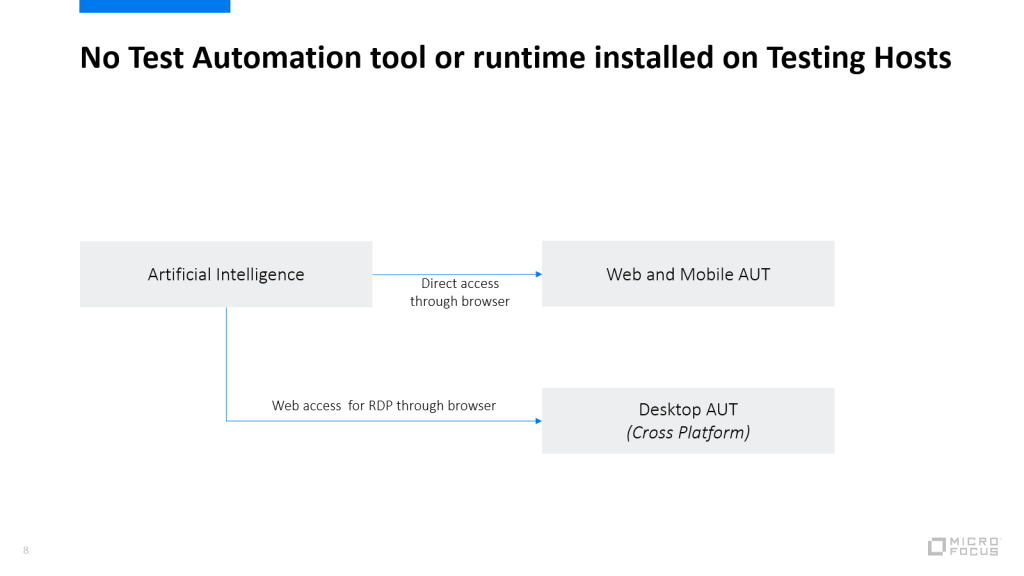
    While as on each testing host a test automation tool instance or run time need to be configured next to all the AUTs, for AI based test execution, it is not necessary to install the testing tools or runtime AND the AUT on the same testing hosts. Web access based on browser will allow the AI engine to access the testing host with the AUT and run the test like a human. This will reduce the maintainence effort building the test automation infrastructure. 

    TESTAUTai.png

    The beauty about this approach is that for Desktop AUTs via web based browser access to the testing host, AI can recognize the AUTs on a cross platform (Windows, Mac, Linux). 

    TESTAUT2.png

    The testing hosts won’t act as isolated hosts anymore and will share the apps across testing hosts. 

    Why web based browser access for remote desktop connections?

    The explaination is simple. Browser based access does not require an installation or plugin nor libraries and work cross platform. This way it is easier to access machine of different operation system using the AI capabilities. This can allow for instance running a UFT desktop GUI Test (which is only windows based) on a Mac or Linux UI for the same AUT (example Java App). 

    The following web based browser access could be tried out:

    • Chrome RDP
    • VMWare Horizon web access
    • Skytap browser access

    Run UFT AI tests on a desktop application

    In the following short video, we will demonstrate how a possible use case could look like using the current capabilities of UFT AI (version 15.0.1) on desktop applications. We will use an UFT client machine to connect to a windows environment using skytap web access with Firefox. On that remote windows machine, there is no UFT installed. Using UFT AI we will run a short automated test on a Windows Presentation Forms (WPF) [FlightGUI.exe] to book a flight order.

    Please note that this is not an officially support feature nor approach, it is part of the content delivered within and by the community forums within Micro Focus. 

    As we have seen, Micro Focus UFT One can leverage AI features to run desktop automation even on client machines which does not have UFT One or UFT run time installed at all. The test automation is running a test like a human would to using a supportive AI engine which creates value by its action.

    Conclusion

    This is just a start of many more investigation areas and a completely new direction of independent AI driven test automation approach, which is not tied to any technical locators or installations on cross environment. 

    Micro Focus UFT comes with an Artificial Intelligence (AI) integrated and allows SAP Fiori apps to be tested using AI. To learn more about it check out this guide

    Related articles:

    Try it out yourself, download UFT One and its artificial Intelligence today: https://www.microfocus.com/en-us/products/uft-one/free-trial

  • Accelerate Testing towards SAP Fiori Transformation using UFT Artificial Intelligence

    Accelerate Testing towards SAP Fiori Transformation using UFT Artificial Intelligence

    SAP Fiori is known as a platform which has revolutionized the user experience for SAP users. It supports multiple browser and devices and come up with a new, modern and fresh UI supporting the bring your own device approach. 

    SAP customers who have transformed their SAP GUI processes to Fiori are amazed by the simplicity and great UX it provides improving the SAP transactions. SAP Fiori can deliver high value as,

    •  it works on any browser-compatible device (phone, pad, laptop, desktop), it is responsive and based on HTML 5.
    • If necessary, data can be accessed within an APP or applications can be run on “on-premise” or “cloud” systems.
    • it is role-based, like a mini portal, but much easier to use.
    • It’s quick because SAP UI5, the technical base, is a low-resource technology that requires minimal hardware.
    • it is a simple, robust platform, because SAP UI5 is based on HTML5 and JavaScript, 2 proven technologies
    • it runs on HANA, which means that even complex HANA evaluations can be seen on your smartphone or tablet in a split second.

    One of the biggest challenges SAP Fiori apps have is the cross platform support, which makes the validation and testing quite complex. The testing team need to make sure, tests are using the different devices an organization plans to support. 

    Testing team need to spent some effort to execute the tests once the SAP Fiori app is available. This causes based on the complexity delays in delivering SAP Fiori apps. Testautomation on the other hand may be promising, but in reality it is performed at a very late stage (once the SAP Fiori apps are available) and it can not cover the platform changes and complexity in a way a human would do it. 

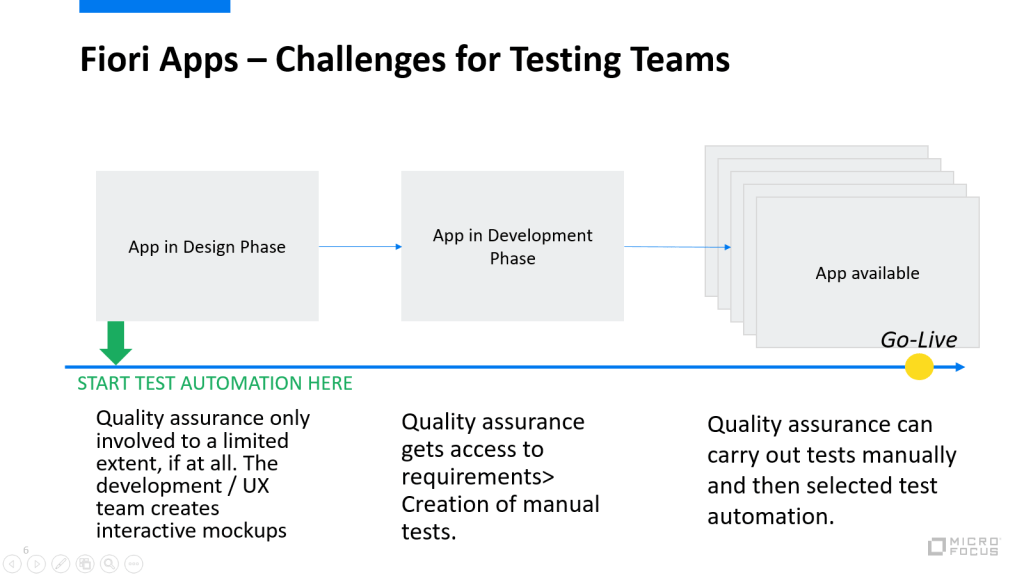
    Here is a simplified Fiori app lifecycle with 3 phases: Design, Develop and Deliver. During the design phase the quality assurance / testing teams are not directly involved. It is more the UX and development teams who work on the Fiori mockups. Once this is completed, the mockups can be imported in to the Web IDE and the app can be developement. At the development stage the quality assurance teams receive the requirements and create manual tests. Only once the app is delivered on a test instance, the quality assurance teams can validate and run the tests manually and identify which of the tests need to be automated. And test automation has to cover all the different platforms. This task can not be performed earlier and results in a high effort manual testing phase. 

    Exactly this problem can be solved using Artificial Intelligence (AI), which is able to execute tests in the same manner like a human would do. It adapts to UI changes and can recognize context specific objects. For instance a “Login” button is renamed to “Sign-In”, test automation tools may fail on these kind of changes and the test cases need to be maintained. A human would still be able to run the test manually as he understands the context of the change (Login VS Sign-In). Similarly AI is able to recognize UI changes and can adopt the execution of test accordingly. But this is not the only thing AI can help accelerating. 

    Lets have a look on the following images:

    What would a test automation tool with object property recognition see here?

    • 3 different screens.

    What would a human see here?

    • 3 different screens with the exact same context, which is Login screens.

    What would AI see here?

    • 3 different screens with same objects, which can be used to login.

    If we refer back to the “Challenges for a testing team” picture above, we can probably identify, that AI can also be used to already create automated tests during the design phase. Using the interactive or non-interactive mockups, AI can understand the context and recognize the objects on even a image (mockup). With this approach tests can be automated without having the app even one single line of code ever written. 

    While shifting the test automation design activities to left, will allow quality assurance teams to save time towards Go-Live. Tests are being automated using AI on mockups and can be fully utilized during the (manual) testing phase. This would reduce the time to production and allow testers to focus on more important tasks while AI is handling the automation. 

    Micro Focus UFT come with an Artificial Intelligence (AI) integrated and allows SAP Fiori apps to be tested using AI. To learn more about it: https://admhelp.microfocus.com/uft/en/15.0-15.0.1/UFT_Help/Content/User_Guide/AI-based-testing-concept.htm

    Check out the following demo video, how AI is used to accelerate the testing processes towards SAP Fiori transformation.

  • Shift Left Testing using UFT AI

    Shift Left Testing using UFT AI

    There have been many discussions around where Artificial Intelligence can help speed up the testing process. In this short video, we will show you, how you can use the UFT AI features together with ALM Octane to accelerate the testing process by shifting left and start the test design even before the application exists. ALM Octane will act as the management tool, while as UFT will cover the design areas for test automation. 

    #UFT #AI #Mockup #UX #UI #Design #ALM #Octane #Continuous #Testing #Functional #Artificial #Intelligence

  • UFT One using Dimension CM & ALM Octane

    UFT One using Dimension CM & ALM Octane

    This short demo shows the integration of UFT One through the GIT protocol to Dimension CM and ALM Octane using the Test Runners.

  • ++++ RELEASE ALERT UFT Mobile 3.4 ++++

    ++++ RELEASE ALERT UFT Mobile 3.4 ++++


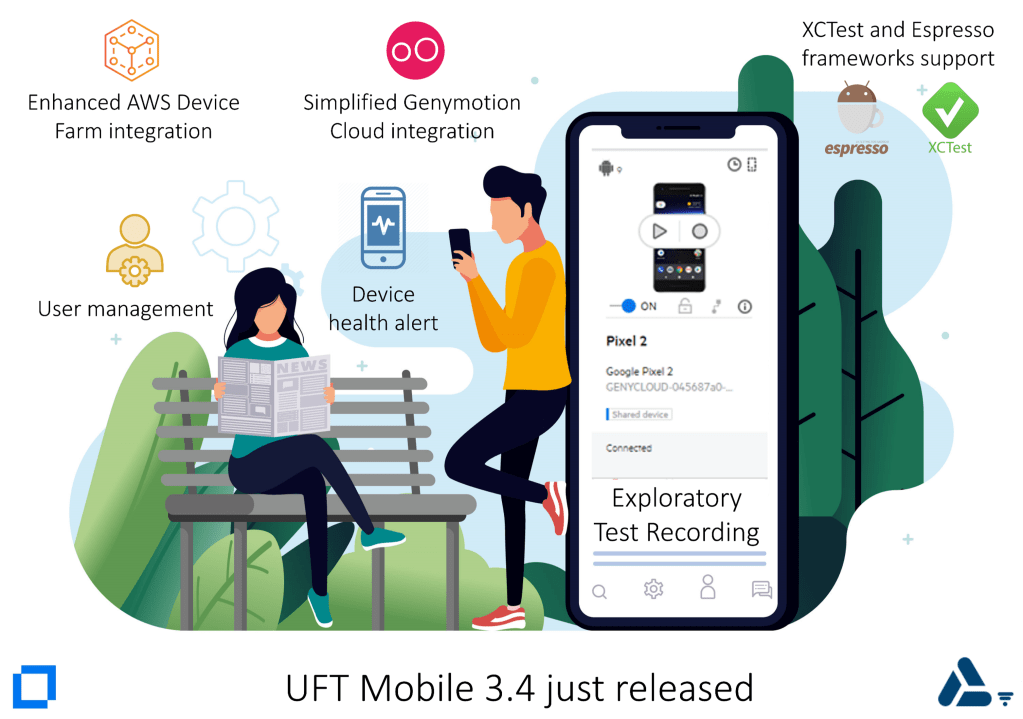
    UFT Mobile 3.4 has just been released.

    It includes a number of new features, enhancements, and fixes.
    – Exploratory test recording
    – Enhanced AWS Device Farm integration
    – Simplified Genymotion Cloud integration
    – XCTest and Espresso frameworks support
    – Device health alert
    – New workspace admin role
    – User management
    – Other enhancements and updates
    – Supported integrations
    – Appium

    Checkout for more information: https://admhelp.microfocus.com/mobilecenter/en/3.4/Content/Whats_new.htm

    #UFT #Mobile. Amplify team productivity with an enterprise-level, end-to-end lab of real mobile devices and emulators.

    #Enterprise-grade #lab #management
    Scalable solution that supports multiple projects and campaigns in the enterprise organization for virtual cross-functional and cross-geography teams

    #App and #browser #testing and #monitoring
    Run manual, automated, performance and security mobile app tests on real mobile devices for native, hybrid and web mobile apps and execute cross-browsers use cases

    #Centralized #gateway
    Full control of all mobile apps, devices, and emulators across the organization, segregated to workspaces

    #Scalable #deployment
    Deploy on-premise or in a hybrid infrastructure, leverage local or cloud-hosted mobile devices.

    #Continuous #improvement and #optimization
    Analyze the usage and provide metering information for the system utilization to support business decisions

  • UFT Developer and Selenium in one test suite

    UFT Developer and Selenium in one test suite

    Selenium VS #UFT #Developer: Speed Test, which tool is faster in execution?

    ;o)

    Last week, I was configuring the ALM Octane test #runners for my demo environment with the usecase having 2 or more test automation tools part of the #ALM #Octane #test #suite. I started with tests of Selenium and UFT Developer and put both within one test suite of ALM Octane. I created the same tests with both of the tools and during execution i saw that UFT Developer is minimum twice as fast as Selenium.

    However this post is about test runners, which you can configure in ALM Octane for the testing tool of your choice.

    Trigger #automated #test runs in your #testing #framework

    This integration enables #ALM #Octane to run tests in your testing framework via your #CI server.

    This is useful in a number of scenarios. For example, suppose your CI server ran #automated #nightly #tests and the ALM Octane #pipeline shows that a specific test #failed. After #pushing a #fix you can run the specific test directly from ALM Octane, rather than running the full pipeline which can be time-consuming.

    Checkout the following article: https://lnkd.in/dYQE8Mz

  • Run Selenium tests directly from ALM Octane (short video)

    Run Selenium tests directly from ALM Octane (short video)

    This integration enables ALM Octane to run tests in your testing framework via your CI server.

    Trigger #automated #test runs in your #testing #framework

    This integration enables #ALM #Octane to run tests in your testing framework via your #CI server.

    This is useful in a number of scenarios. For example, suppose your CI server ran #automated #nightly #tests and the ALM Octane #pipeline shows that a specific test #failed. After #pushing a #fix you can run the specific test directly from ALM Octane, rather than running the full pipeline which can be time-consuming.

    The ALM Octane-testing framework integration includes the following steps:

    #Create a job in your CI server. To set up the integration, create a job on your CI server to run tests on your testing framework.

    #Create a test runner in ALM Octane. In ALM Octane settings, create a test runner entity that corresponds to this job on your CI server.

    #Run tests. In ALM Octane, create a test suite that includes tests that you want to run in your testing framework, and run the suite. ALM Octane triggers the test runs via the job in the CI server.

    #Analyze release and product quality. Track the test results as part of the overall data in the backlog, quality, and dashboard modules.

    #Micro #Focus #ALM #Octane #DevOps #management #platform #enterprise #application #quality #criteria, #continuous #visibility #delivery

  • Configure TestRunners for ALM Octane (Step-by-Step Guide)

    Configure TestRunners for ALM Octane (Step-by-Step Guide)

    This integration enables ALM Octane to run tests in your testing framework via your CI server.

    This is useful in a number of scenarios. For example, suppose your CI server ran automated nightly tests and the ALM Octane pipeline shows that a specific test failed. After pushing a fix you can run the specific test directly from ALM Octane, rather than running the full pipeline which can be time-consuming.

    In this article, the testrunner is configured for  MAVEN & JENKINS.

    Overview

    • Pre-requisites
    • Configure a Jenkins job
    • Create TestRunner in ALM Octane
    • Run Tests from ALM Octane
    • Conclusion

    Pre-requisites

    In order to configure the test runners with ALM Octane, make sure you have a testing framework in place with Maven, Gradle or Protractor and the automated test cases are being executed properly within the framework. 

    1. You must have a CI server connected to ALM Octane. For more details, see Set up CI servers.
    2. Within ALM Octane, create a pipeline to inject tests from your testing framework via your CI server. For more details, see Create and configure pipelines
    3. Out-of-the-box, the integration supports the following frameworks via Jenkins, Bamboo, or Team City:
      1. JUnit and TestNG tests over Maven
      2. Protractor
      3. Gradle
    4. Using the Jenkins plugin version 5.9 or later, you can trigger automated runs in other frameworks using the Custom option, as described below.

    You must have a CI server connected to ALM Octane.

    This example show a Jenkins pipeline with 80 automated tests. Lets assume, from 80 tests in a future job run 5 tests fails, and you want to run only the failed tests instead of the whole pipeline, then you would need test runners. 

    Step 1 –  Create a job on your CI server to run tests in your testing framework

    On your CI server, create a job that runs specific tests on your testing framework.

    In addition to the command to run tests on your framework, this job must include the testsToRun parameter. The testsToRun parameter receives a lists of tests from ALM Octane that the job will then run. The parameter uses the following syntax: v1:package name|class name|test name;package name|class name|test name.

    You will then need to convert the contents of this parameter to a syntax that can be used by your testing framework.

    In addition to the testsToRun parameter, add the following to your job in Jenkins:

    • Micro Focus ALM Octane testing framework converter build step/task.
    • Publish JUnit test result report post-build action.

    Create – On your CI server, create a job that runs specific tests on your testing framework.

    Create a job of type “Freestyle Project” in Jenkins.

    Parametrize – On the job add the testsToRun parameter

    Add a build tasks in Jenkins

    In addition to the testsToRun parameter, add the following to your job in Jenkins.

    Micro Focus ALM Octane testing framework converter – this should be before running your Maven goal. It makes sense to previously check, if Maven is running the tests using mvn from the commandline.

    Dieses Bild hat ein leeres alt-Attribut; sein Dateiname ist large.

    Add an additional build task after the framework converter:

    Invoke top-level Maven targets directly after the tasks Micro Focus ALM Octane testing framework converter. 

    Add Post Build Task – Publish JUnit test result report post-build action.

    Step 2: Create a test runner in ALM Octane

    After the job has been configured on your CI Server, goto the workspace configuration under the DevOps section to add a new test runner.

    • In ALM Octane, click Settings  > Spaces and select a workspace.
    • Select the DevOps > Test Runners tab.
    • Click + Test Runner.
    • Define a name for the test runner, for example JUnit Runner.
    • Select your testing framework, for example JUnit.
    • Select your CI server.
    • Select the job that you created in the CI server to run the tests in your testing framework. The list displays the jobs that have the testsToRun parameter.
    • Click Save. ALM Octane creates a test runner to trigger the job that runs your tests.

    If you build is parametrized, ALM Octane will show the default dataset with all the parameters and their default values. You can define additional parameter sets by adding (“+”) a new set. For example, this makes sense when you want to run same test on different environments with different users. 

    Step 3: Run tests from ALM Octane

    • Assign test runners to tests in the Quality module. You can then add the tests to test suites and run them from ALM Octane.
    • ALM Octane triggers test runs via the job in the CI server that is specified in the test runner. After adding tests to a suite you can select a different test runner for a test in the suite. In addition, after planning a suite you can select a different test runner for a test run.
    • A suite can include automated tests using multiple test runners. When a suite includes both manual tests and automated tests, the automated tests run in the background while you perform the manual tests.
    • When you run a test, its status in ALM Octane is Planned until the test runner starts to run the tests in the CI server. The test’s status changes to In Progress, until the test results are returned to ALM Octane.

    Identify failed tests from pipeline run

    Once there are test failures during a pipeline run, perform your failure analysis and fix the problem and run only the failed tests using the defined test runners.

    Create a new Test Suite in ALM Octane

    You want to run after the fix only the 5 tests and not the comeplete pipeline. To do this, create a new test suite in ALM Octane for the failed tests. These tests can be executed by different testing tools and frameworks. The mapping between tests and testrunners happens in the test suite. 

    Select the Test Runner for the Tests

    For instance, if your pipeline had test execution from UFT One, UFT Developer, Selenium, SoapUI and JUnit Tests, then you could define test runners per testing tool or testing framework. You can decide which test would be part of the next run.

    Run the Testuite

    • Enter the name of this Run.
    • Press „Lets run“ to run the suite.
    • ALM Octane will start the test execution and the selected tests will be executed.

    The test suite will run directly from ALM Octane.

    You can track the execution state in the suite run under the RUNS tab. 

    Track the Results ALM Octane

    Test Runner will report the execution result to ALM Octane.

    In case your tests are parametrized, you need to select the correct dataset when planning the suite run. 

    Conclusion

    Test runners are a great approach to execute test cases directly from ALM Octane. It allows users to drilldown on tests that matter to validate a fix instead to run the full pipeline including all automated tests. It also allows a flexible way to integrate test automation tools of your choice and implement the transition from manual testing to automated testing in an integrated way by linking manual tests to its corresponding automated tests directly in ALM Octane. 

    This allows you to capture the transition from manual to automated testing on a timeline to better understand the automation coverage towards continuous testing.

    testrunnermanual.png