Category: Artificial Intelligence

  • Integrate RPA Bots into your existing tool chain

    Integrate RPA Bots into your existing tool chain

    RPA tools (Robotic Process Automation) are great solutions for automating boring, expensive, and repetitive workflows. RPA is designed to follow a pattern of user interactions and can free up valuable human resources by allowing software to perform repetitive tasks related to business processes. RPA tools provide the possibility for organizations to build a virtual workforce that works around the clock and continuously performs tasks without any human intervention.

    Basically, RPA tools consist of 3 basic components: Designer, Orchestrator and Robot.

    The Designer (also Studio) is used to create and design automated processes.

    The Orchestrator is the brain of a RPA solution. It coordinates the execution of the automated processes based on user input or periodically. It also takes care about the management of the robots, which are part of the topology of an RPA platform.

    The Robot are software robots which actually execute and run the automated process.

    Common Misunderstanding

    When we talk about integrating RPA into existing set of tools, we mostly refer to the workflows and processes we aim to automate using RPA. This usually starts by identifying the workflows and processes where high amount of human effort and time is involved by executing repeatable tasks. These tasks are mostly performed on the frontend of a software, such as SAP, Outlook, Microsoft Dynamics, Salesforce, etc. This kind of integration is referring to the recognition capabilities of an RPA tool and not of being integration into an existing tool set.

    The Need to integrate

    Let us assume, we have an ITSM process, where employee open an internal ticket or service request when they need to order a new phone, laptop or any other asset required to do the job. Today this is completely manual. Once ticket is created and approved, someone need to place an order of the asset and interact manually with the ordering system. In order to integrate and benefit from RPA, the ITSM tool should be able to execute an automated Bot from the RPA platform as part of the ITSM workflow.

    Once RPA is integrated into an ITSM workflow, the user will need to submit the ordering request/ticket. Once request/ticket is accepted, the manager / approver will approve or decline the request. If request is declined, ticket is updated as usual as part of the ITSM workflow. In case of approval, RPA bot(s) will be triggered, which will extract the employee information from the ITSM ticket such as job level, location & cost center and order the asset required by the employee. This will consist activities to login to the asset ordering tool place the order based on the job level of employee. Once order is placed, the billing need to be mapped to the correct cost location, as well as the correct employee location need to be added as delivery address. Once completed, a confirmation email is sent to the employee and his manager. After this the ITSM workflow is set to the next phase.

    RPA is not only for business (users)

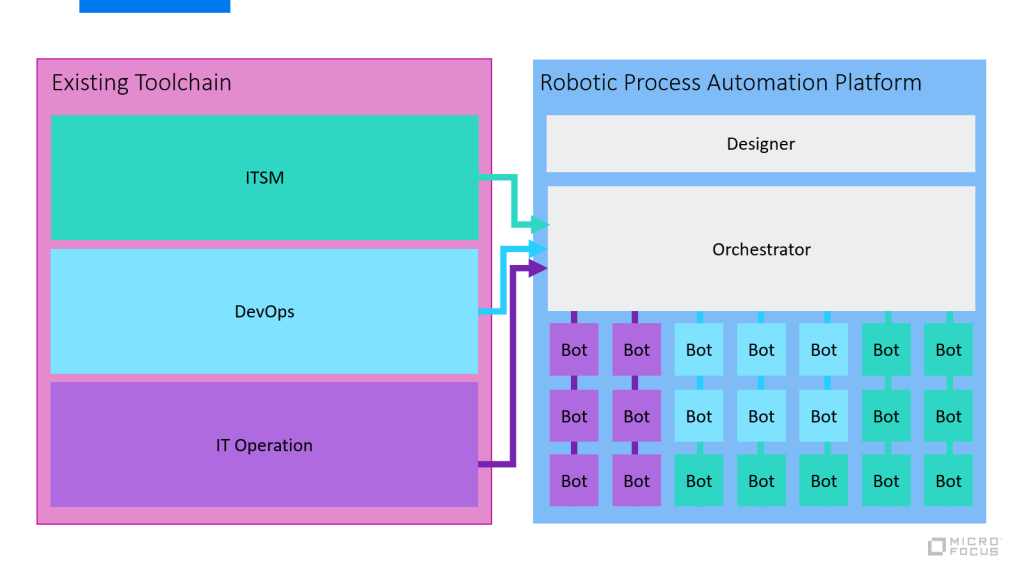
    To integrate fully automated bot(s) as part of your existing tool chain, it should be possible to access and execute the bots using open interface (such as REST API, SDK, etc.) on the RPA platform (usually on the orchestrator). This is crucial to be able to integrate and scale RPA within an organization. When RPA tools are evaluated and implemented, they are not integrated in any of the existing tool chains, such as ITSM, DevOps, IT Operations, Asset Management, Development Eco System, etc. This is a mistake as RPA implementation gain on maturity, this aspect become more important to the overall automation initiatives.

    RPA at enterprise level

    On long term, RPA will not only be used to automate business processes and increase productivity — on the contrary: Existing tool chains will require the need to integrate and consume their own bots as part of accelerating automation and improvement. Therefor a cross consumption is unavoidable.

    The following diagram shows an example how RPA evolves and integrates into the different tool chains.

    For example, ITSM processes will manage, consume and integrate their bots into the ITSM workflow as needed, same goes for DevOps (preparation and post activities), IT Operations, Business, CRM, etc.

    This allows a flexible consumption of RPA across department and teams and will not be isolated anymore. Share, reuse and collaboration will increase to productivity for RPA and build a automation community within an organization to support all aspects of automation (Testautomation, RPA, Service, IT Process, etc.).

    Conclusion

    The reason many organizations are failing adopting RPA solution is the fact that often it is evaluated as a point solution focusing on automation aspects only. When it comes to scaling bots by integrating into existing tool sets, it starts to get complicated as initial evaluation were made for a specific department and not completely validate for the enterprise need.

    Micro Focus Robotic Process Automation gives you the power to build, secure, and scale automated processes, from legacy to modern, across the enterprise. Combining UI and API operations to centrally orchestrate the work of robots, Micro Focus RPA liberates human brainpower and ignites enterprise productivity. It provides an open REST API to integrate automated bots into your existing tool chain, independently from the tool sets in place.

    Start your trial today: https://www.microfocus.com/en-us/products/robotic-process-automation/overview

    Check out related articles: https://community.microfocus.com/t5/Application-Delivery-Management/How-can-Micro-Focus-RPA-accelerate-software-testing/ba-p/2778978

  • Test Automation: Going beyond the limits using UFT One AI-Based Testing

    Test Automation: Going beyond the limits using UFT One AI-Based Testing

    Now this is an article which will make the hearts of test automation engineers beat faster. In our last blog, we have talked about the opportunity enabled by AI-based testing, where amongst other things we demonstrated running an UFT tests on a windows machine where no UFT Installation existed. Today we are going even above the limits and will explain how you can execute UFT GUI tests on a Ubuntu machine. What? No this is not a typo, yes on a Ubuntu machine, on a Linux operating system

    ab-feat.jpg

    With the latest UFT One release (15.0.1) and its embedded Artificial Intelligence (AI) engine, you can cover many use cases, which were never discovered before. 

    The Linux operating system was so far a ‘No-Go’ area for Windows UI Test Automation Tools. Cross OS GUI tests were not possible at all for Java apps supporting not only windows but also other operating systems. Micro Focus huge investment in the AI-based Testing has changed the territory for Test Automation and test automation engineer can explore their current limits and go beyond it using UFT One AI based testing approach.

    In our use case we will use the browser based RDP access to accomplish this use case. It is very important to access the remote desktop you want to automated using a browser based RDP. We have tried the following browser based RDPs:

    • Chrome RDP – Chrome Remote Desktop is fully cross-platform. Provide remote assistance to Windows, Mac and Linux users, or access your Windows and Mac desktops at any time, all from the Chrome browser on virtually any device, including Chromebooks.
    • Skytap Cloud – Skytap Cloud is an enterprise service purpose-built for the development and testing of complex applications. 
    • VMware Horizon – Using VMware Horizon™ HTML Access Web client 4.1, you can connect to remote desktops and applications without having to install any software on your client system.

    Find as follow the architecture view of what we have prepared to evaluate this use case.

    ubuntu.png

    In order to make UFT run a GUI (graphical user interface) test on a Ubuntu (Linux operating system), we have installed the following virtual machines:

    • Windows Client with UFT One and embedded AI engine
    • Ubuntu machine with postman as the application under test

    The test we created was on a publicly available REST API for accessing weather data for any location. This api will be consumed by the native linux app postman in our demonstration test case.

    The demonstration was only with one machine, but long term solution could have multiple client machines with different operating systems running. 

    ubuntumulti.png

    The client architecture could have a Mac-book, CentOS, Debian, Ubuntu, Windows and other operating system. On none of the client machine UFT One + AI need to be installed, the only key criteria is the RDP access based on a browser. The AI engine will set the context based on the browser and recognize the objects. 

    We have recorded a demo video where UFT One executes a GUI test on Ubuntu machine using Postman as the application under test. 

    This capability is not an officially supported feature of UFT One 15.0.1. AI engine. It has been evaluated as part of the community content and summarized in this blog. 

    Happy Testing!

  • How Artificial Intelligence is changing Test Automation? Micro Focus is leading the way…

    How Artificial Intelligence is changing Test Automation? Micro Focus is leading the way…

    When you (re-)search “artificial intelligence impacting test automation”, you will find alot of unclear or future looking statements, how Artificial Intelligence (AI) will impact test automation. On the other hand, alot of new tools will be appointed as AI testing tools, which have never been or seen before in test automation. This article will give you different practical examples, how AI is changing test automation and Micro Focus is leading the way… and for sure, AI is much more than only the examples of this article…

    When we think about AI, we often thing about it as a feature or a tool, which removes all the obstacles we face in testing, all the overload and manual intervention or even effort on maintenance or analysis. Obviously finding solutions to our problems through machine learning and AI to make our lives easier is our long term goal. 

    taobstacles.png

    Most of the challenges are huge pain for organization and causes attention. But taking a closer look at those, majority of the test automation challenges are execution or even post activities. Lets take a few steps back and face AI in the current state and see how it already benefits the testing process. Even in areas we don’t have the highest focus on attention. Lets see AI more as a capability, which supports us during the whole continuous testing process, espacially when we look into test automation.

    What is AI in context of test automation? 

    To understand AI in context of test automation, we have to understand how AI is defined in general.

    ai wiki.png

    According to Wikipedia, AI:

    • represents the intelligence of machines in contrast to the natural intelligence by humans. 
    • also appointed as “intelligent agents”
    • describe machines that mimic “cognitive” functions 

    Lets unpack the definition for a moment.

    Representative intelligence similar to ours (of humans) – natural intelligence is shaped by its lifecycle through out the age of each individual. How is the natural intelligence shaped? The shaping is part of the learning process of human brains, either by experience or by another individual (parents, friends, teachers,), etc.. Similarily AI is shaped majorily through individuals (company, open source, etc.) and experience based on pattern of its neural network.

    Mimic cognitive functions – mimic appoints here in imitating actions of someone while as cognitive functions makes it more valuable for humans. In other words, providing value by acting similar to humans.

    Intelligent agents – this is the most important one for us in context for test automation; AI as acting agents. Definition of an agent is “acting on behalf of another person”

    We can see AI as a supportive capability which provides value by acting

    Apply AI on your test automation process

    testautoprocess.png

    Lets take a look on the test automation process from a high-level perspective. We assume to have 5 major phases during the process. 

    Identify – at this stage, the testing team decides to automated test cases for (any) selected application(s). Typically the selected application is running in production.

    Build – during this phase, the test automation engineer or representative scans the application to build a fundament for test automation either as framework, reusable models or scripts. At this stage the application need to be atleast available on a testing instance as this is very important for the test automation engineer to understand how the technical identification of the application objects is set up. This is a time consuming and crucial phase for the test automation process. 

    Design – this phase now brings the reusable models or scripts together using the framework. At some organization Build & Design are performed at the same time.

    Execute – at this stage, the automated tests are ready to execute. The execution takes place typically on multiple automation hosts reserved to run automated tests. On these machines the automation framework and run time need to be configured. Testing hosts costs alot when idling, therefor many organizations work with spin up and spin down of testing hosts when they need it. And this is also very time consuming in concern of designing and maitaining the spin up & down approach. For cross platform, browsers and / or devices, the scalability becomes even more challenging. 

    Maintain – at this stage, the test automation engineer adopt and apply all kind of changes to the test automation framework and make sure test cases are stable. The test maintenance is one of the keys to successful test automation. 

    If we filter out the phases with the highest time and effort spent on, we will identify the BUILD and EXECUTE phases. 

    What is the reason for spending high effort and time during these phases? 

    maintain.png

    Understand the time and effort spent on BUILD phase:

    • UI test automation requires the application to be available during build phase as the technical identification of the test object is crucial for scanning and creating the framework.
    • Test automation tools can not work with objects, which they technically can not identify.
    • Only trained individuals can work with test automation tools and need to have a technical understanding on how to best build the test automation libraries or models. 

    Understand the time and effort spent on EXECUTE phase:

    • Testing hosts can only understand the test cases to run, if at least a runtime is installed on the machine additionally to the application under test (AUT).
    • Testing hosts are not easy to setup, especially open source test automation requires different libraries for different OS, AUT, browsers and devices.
    • Spin up and spin down need to be defined and it takes time to get initiated and run.

    Lets summarize our findings first before understanding how to best make use of AI. The build and execute phases are time consuming, because of technical limitation of test automation tools and capabilities. These limitation would not exist if a human would handle the build and execute phases. On the other hand, a human would not perform as good as a machine across hours for the same repetitive tasks.

    Shift-left: AI based testing

    What if we can build the test cases prior the application is available (at all)? This would allow us to speed up the process and shifting to the complete left starting test automation. Watch the following short video to understand how the BUILD phase use mockups for test automation, even far before it exist based on interactive or non-interactive mockups.

    As mockups are very useful for developers, why it is not possible to leverage it for test automation? Having the AI capabilities, allow us to automated application under test (AUT) even before they have been developed. Similarily a human is able to see a mockup and identify what kind of objects are displayed on it. It is the same behaviour as a human would perform test execution using a test script and executing according to the test guidance. The human brain power will recognize the objects at run time. 

    shiftleftai.png

    Starting test automation by using mockups will accelerate the testing phase by reducing the time for manual test execution. AI can understand the context and recognize the objects on even an image (mockup). With this approach, tests can be automated without having the app even one single line of code ever written. While shifting the test automation design activities to left, will allow quality assurance teams to save time towards Go-Live. Tests are being automated using AI on mockups and can be fully utilized during the (manual) testing phase. This would reduce the time to production and allow testers to focus on more important tasks while AI is handling the automation. 

    Now lets examine the same for the EXECUTE phase. As majority of testing hosts are virtual machines (cloud or on-premise), it would be great if AI can leverage the testing host in the same manner as a human would do. 

    Today the test automation infrastructure requires a dedicated setup for test execution, which need to be maintained continuously in order to keep the latest versions of toolset and plugins work together and stable. Beside the test automation tools, the set of AUT(s) need to be installed and configured as well. Each testing hosts acts as an isolated hosts with all the components deployed to run the automated tests.

    TESTAUT.png

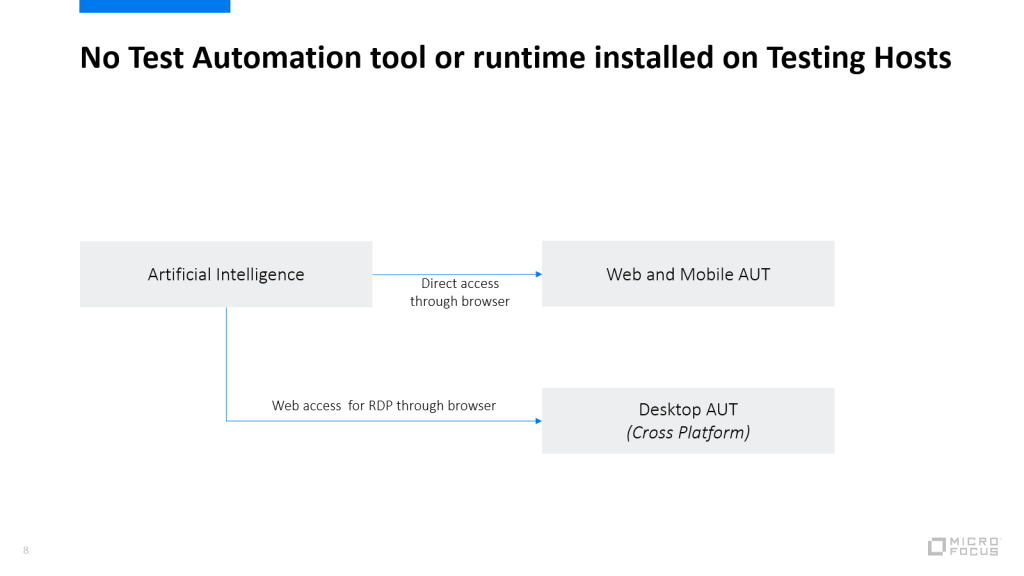
    While as on each testing host a test automation tool instance or run time need to be configured next to all the AUTs, for AI based test execution, it is not necessary to install the testing tools or runtime AND the AUT on the same testing hosts. Web access based on browser will allow the AI engine to access the testing host with the AUT and run the test like a human. This will reduce the maintainence effort building the test automation infrastructure. 

    TESTAUTai.png

    The beauty about this approach is that for Desktop AUTs via web based browser access to the testing host, AI can recognize the AUTs on a cross platform (Windows, Mac, Linux). 

    TESTAUT2.png

    The testing hosts won’t act as isolated hosts anymore and will share the apps across testing hosts. 

    Why web based browser access for remote desktop connections?

    The explaination is simple. Browser based access does not require an installation or plugin nor libraries and work cross platform. This way it is easier to access machine of different operation system using the AI capabilities. This can allow for instance running a UFT desktop GUI Test (which is only windows based) on a Mac or Linux UI for the same AUT (example Java App). 

    The following web based browser access could be tried out:

    • Chrome RDP
    • VMWare Horizon web access
    • Skytap browser access

    Run UFT AI tests on a desktop application

    In the following short video, we will demonstrate how a possible use case could look like using the current capabilities of UFT AI (version 15.0.1) on desktop applications. We will use an UFT client machine to connect to a windows environment using skytap web access with Firefox. On that remote windows machine, there is no UFT installed. Using UFT AI we will run a short automated test on a Windows Presentation Forms (WPF) [FlightGUI.exe] to book a flight order.

    Please note that this is not an officially support feature nor approach, it is part of the content delivered within and by the community forums within Micro Focus. 

    As we have seen, Micro Focus UFT One can leverage AI features to run desktop automation even on client machines which does not have UFT One or UFT run time installed at all. The test automation is running a test like a human would to using a supportive AI engine which creates value by its action.

    Conclusion

    This is just a start of many more investigation areas and a completely new direction of independent AI driven test automation approach, which is not tied to any technical locators or installations on cross environment. 

    Micro Focus UFT comes with an Artificial Intelligence (AI) integrated and allows SAP Fiori apps to be tested using AI. To learn more about it check out this guide

    Related articles:

    Try it out yourself, download UFT One and its artificial Intelligence today: https://www.microfocus.com/en-us/products/uft-one/free-trial

  • Accelerate Testing towards SAP Fiori Transformation using UFT Artificial Intelligence

    Accelerate Testing towards SAP Fiori Transformation using UFT Artificial Intelligence

    SAP Fiori is known as a platform which has revolutionized the user experience for SAP users. It supports multiple browser and devices and come up with a new, modern and fresh UI supporting the bring your own device approach. 

    SAP customers who have transformed their SAP GUI processes to Fiori are amazed by the simplicity and great UX it provides improving the SAP transactions. SAP Fiori can deliver high value as,

    •  it works on any browser-compatible device (phone, pad, laptop, desktop), it is responsive and based on HTML 5.
    • If necessary, data can be accessed within an APP or applications can be run on “on-premise” or “cloud” systems.
    • it is role-based, like a mini portal, but much easier to use.
    • It’s quick because SAP UI5, the technical base, is a low-resource technology that requires minimal hardware.
    • it is a simple, robust platform, because SAP UI5 is based on HTML5 and JavaScript, 2 proven technologies
    • it runs on HANA, which means that even complex HANA evaluations can be seen on your smartphone or tablet in a split second.

    One of the biggest challenges SAP Fiori apps have is the cross platform support, which makes the validation and testing quite complex. The testing team need to make sure, tests are using the different devices an organization plans to support. 

    Testing team need to spent some effort to execute the tests once the SAP Fiori app is available. This causes based on the complexity delays in delivering SAP Fiori apps. Testautomation on the other hand may be promising, but in reality it is performed at a very late stage (once the SAP Fiori apps are available) and it can not cover the platform changes and complexity in a way a human would do it. 

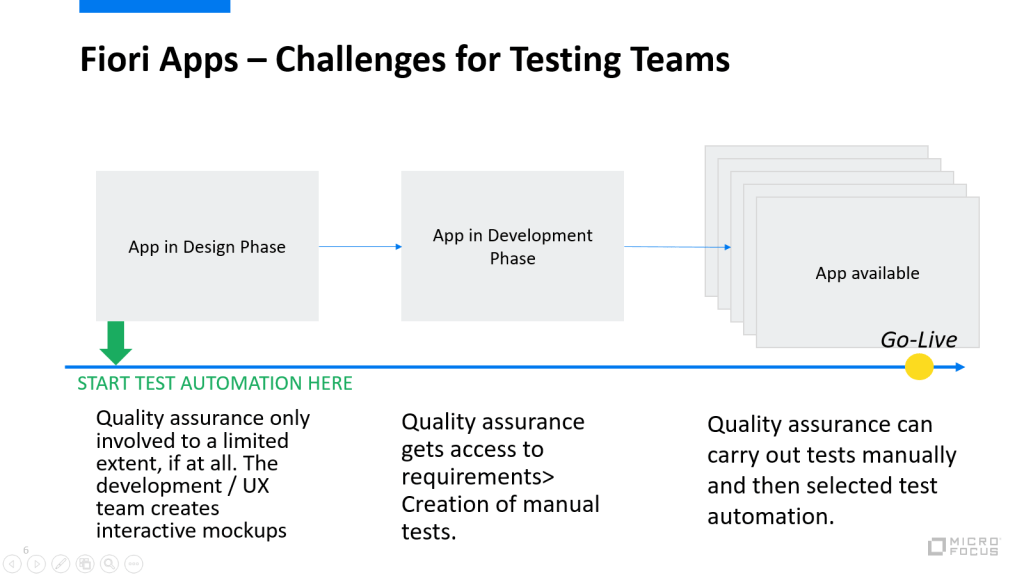
    Here is a simplified Fiori app lifecycle with 3 phases: Design, Develop and Deliver. During the design phase the quality assurance / testing teams are not directly involved. It is more the UX and development teams who work on the Fiori mockups. Once this is completed, the mockups can be imported in to the Web IDE and the app can be developement. At the development stage the quality assurance teams receive the requirements and create manual tests. Only once the app is delivered on a test instance, the quality assurance teams can validate and run the tests manually and identify which of the tests need to be automated. And test automation has to cover all the different platforms. This task can not be performed earlier and results in a high effort manual testing phase. 

    Exactly this problem can be solved using Artificial Intelligence (AI), which is able to execute tests in the same manner like a human would do. It adapts to UI changes and can recognize context specific objects. For instance a “Login” button is renamed to “Sign-In”, test automation tools may fail on these kind of changes and the test cases need to be maintained. A human would still be able to run the test manually as he understands the context of the change (Login VS Sign-In). Similarly AI is able to recognize UI changes and can adopt the execution of test accordingly. But this is not the only thing AI can help accelerating. 

    Lets have a look on the following images:

    What would a test automation tool with object property recognition see here?

    • 3 different screens.

    What would a human see here?

    • 3 different screens with the exact same context, which is Login screens.

    What would AI see here?

    • 3 different screens with same objects, which can be used to login.

    If we refer back to the “Challenges for a testing team” picture above, we can probably identify, that AI can also be used to already create automated tests during the design phase. Using the interactive or non-interactive mockups, AI can understand the context and recognize the objects on even a image (mockup). With this approach tests can be automated without having the app even one single line of code ever written. 

    While shifting the test automation design activities to left, will allow quality assurance teams to save time towards Go-Live. Tests are being automated using AI on mockups and can be fully utilized during the (manual) testing phase. This would reduce the time to production and allow testers to focus on more important tasks while AI is handling the automation. 

    Micro Focus UFT come with an Artificial Intelligence (AI) integrated and allows SAP Fiori apps to be tested using AI. To learn more about it: https://admhelp.microfocus.com/uft/en/15.0-15.0.1/UFT_Help/Content/User_Guide/AI-based-testing-concept.htm

    Check out the following demo video, how AI is used to accelerate the testing processes towards SAP Fiori transformation.

  • Shift Left Testing using UFT AI

    Shift Left Testing using UFT AI

    There have been many discussions around where Artificial Intelligence can help speed up the testing process. In this short video, we will show you, how you can use the UFT AI features together with ALM Octane to accelerate the testing process by shifting left and start the test design even before the application exists. ALM Octane will act as the management tool, while as UFT will cover the design areas for test automation. 

    #UFT #AI #Mockup #UX #UI #Design #ALM #Octane #Continuous #Testing #Functional #Artificial #Intelligence