Micro Focus UFT Mobile provides an end-to-end quality lab of real devices and emulators that help you test, monitor, and optimize your mobile apps for an enhanced user experience.
🚀Increase team productivity Enterprise lab and management gateway with remote access to real mobile devices and emulators to support continuous testing of omnichannel apps.
🕚Accelerate dev and testing velocity Remote development, debugging, and testing with preferred IDE/tool and services, sensors, interfaces, and network virtualization.
📉Reduce overall spend Integrations with open source automated testing tools such as Appium and Selenium reduce costs and lower technical barriers.
🔄Drive continuous improvement Analyze availability and performance via production monitoring, utilizing Micro Focus UFT One, VuGen, and BPM.
What makes a product a great product? Is it user experience, ease of use, integrations, dashboards, reporting? You can have all of this, but if your customers don’t enjoy working with your product, it won’t be a great product. Continuous feedback from our customers has made ALM Octane the platform that it is today. Listen to this collected feedback by real users.
It has been a tough year, which is coming to an end. 2020 was a challenging, but also a very successful year for Micro Focus. We have launched many releases with great content across our software portfolios. We received great feedbacks, commitments and appreciations from our customers, partners and the community. 5 years ago, ALM Octane was a visionary product and today, it is the backbone of many organizations software delivery process. We are grateful for the loyality, belief and trust our community has put in Micro Focus ALM Octane and we THANK YOU for this commitment! Here are some of the faces behind the amazing product ALM Octane appreciating your commitment throughout a very successful Year 2020.
wie viele von Euch bereits gehört haben, hat Atlassian die Produktreihe “Server” zum 02.02.2024 für die meisten Produkte (Jira, Confluence, etc.) vollständig einzustellen – schon ab dem 02.02.2021 treten dabei erste Änderungen in Kraft. Ich habe die wichtigsten Termine auf der Timeline nachfolgend kurz zusammengefasst:
Ab 02.02.2021: Keine neuen Server-Lizenzen erwerbbar
Ab 02.02.2021: Preiserhöhungen für Produktreihen Data Center und Server
Ab 01.05.2021: Hersteller können keine neuen Apps auf den Atlassian Marketplace stellen
Ab 02.02.2022: Keine Usertier-Upgrades & -Downgrades möglich
Ab 02.02.2023: Keine neuen Server App-Lizenzen erwerbbar aus dem Atlassian Marketplace
Ab 02.02.2024: Server- & Apps werden nicht mehr von Atlassian supportet
Nun stehen seitens Atlassian folgende 2 Optionen für alle Jira Server Kunden zur Wahl:
Migration in die Atlassian Cloud
Migration zu On-Premise Data Center
Falls ihr Euch für eines der beiden Migrationspfade entscheidet, solltet ihr folgendes beachten. Für Cloud Migration gilt:
Wichtige Security Themen mit eurer IT Security abklären, u.a. User & API Access, Zugriff auf Eure Daten durch dritte, Marketplace Apps und Ihre REST APIs, etc.
Die REST API auf Cloud vs On-premise is komplett unterschiedlich, sprich:
Plugins die auf On-premise verfügbar sind und nicht auf der Cloud
Die Integration basierend auf REST API müssten komplett angepasst werden
Alle Reports basierend auf REST API müssten komplett angepasst werden
Die Daten von Jira Server müssten in die Atlassian Cloud migriert werden, je nach Version + Plugins kein schönes Erlebnis.
Atlassian Cloud Ansatz “you get what you’re given” passt nicht jedem, wie z.B. Changes in Betrieb übernacht
Wichtige Audit Themen mit eurer IT Audit abklären
Administrative Restriktionen, wo Jira Support benötigt wird, welches einfach umgesetzt worden sind auf dem Jira Server
Integrationen mit On-premise lösungen wir Jenkins, Teamcity, IntelliJ, Git, nicht stets stabil – Im PoC verifizieren
Jira Server stand nicht immer für die besten Performance Erlebnisse, daher auch die Atlassian SLA’s genauer unter die Lupe nehmen
Für Data Center Migration gilt:
Migrationsaufwände geringer als in die Atlassian Cloud
Data Center Lizenzen und Deployment sind um ein vielfaches teurer
Beim Einsatz der eingebetteten HSQL Database muss eine Migration auf einer externen Database (welche durch Data Center supportet ist) stattfinden.
Falls nun keine dieser Optionen für Euch ein gangbarer Weg ist, gibt es noch eine 3 Option. Migration Eurer Jira Server Projekte nach ALM Octane und dafür gilt:
Ihr könnt zwischen On-premise oder SaaS Betriebsmodellen wählen. On-premise beinhaltet auch den support für eure private clouds auf Microsoft Azure oder AWS.
Für den Betrieb auf Docker stehen Docker Images für ALM Octane bereit.
ALM Octane Developer Lizenzen deckt die komplette Jira Software Komponente aus Feature und Pricing Sicht gut ab, mehr Infos hier.
ALM Octane unterstützt 2 Lizenz Modelle: Named vs Concurrent User
In einem detailierten PoC mit Euch untersuchen wie eine Migration von Jira nach Octane durchgeführt und umgesetzt werden kann.
Micro Focus Customer Success, Partner und lokales Team unterstützen und beraten Euch bei der Jira Migration nach ALM Octane.
Wenn ihr heute Jira und ALMQC im Einsatz habt, könntet ihr durch den Einsatz von ALM Octane auch infrastruktur Kosten für Jira und ALMQC Betrieb komplett einsparen
und natürlich solltet ihr auch hier die Security und Audit Themen mit Eurer IT Abteilung verifizieren
Terminlich könnt ihr ab sofort loslegen, je früher desto besser!
Falls ihr ein Meeting bzgl. dieses Thema mit uns wünscht, gebt mir bitte Bescheid.
Most organizations fail to establish continuous testing as part of their software delivery process due to missing governance on automation coverage as well as the measurement of key indicators. This is caused by not existing or wrong feedback on the business risks associated with a software release.
Before we start our continuous testing initiatives, we need to answer the following 2 questions:
Why do we need automated testing as part of the continuous delivery pipeline?
What is our expectation towards automation?
Use Automation as a Servant to the Teams
The need of automated testing as part of continuous delivery is crucial to the speed of delivery and to obtain early and fast feedback during the release execution. This will also reduce the manual process in executing test cases and help organization to focus on exploratory testing. Through this we can achieve the following key performance indicators:
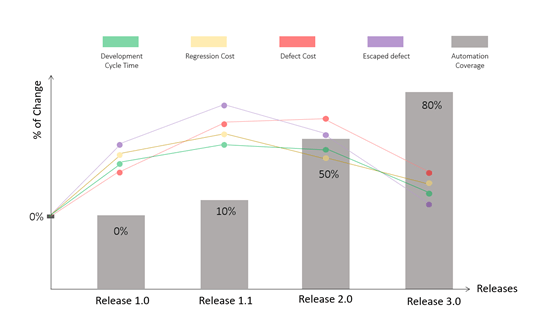
Reduce development cycle time – Good automation should help increase the development speed.
Reduce regression cost – By investing in automation, you can reduce repetitive execution of manual regression tests and improve your testing strategy by allowing QA to focus on other essential tasks.
Reduce defect cost – By comparing the number of defects detected early by automation (low cost defects) vs. defects submitted after manual runs (high cost defects), you can determine the cost of defects.
Reduce number of escaped defects – The escaped defect reflects how many defects were missed by your testing activities. It also indicates whether your testing strategy is improving when you reduce the number of escaped defects that reach production.
The expectation from automated testing as part of the delivery pipeline is a common team goal. Automation always serves a purpose and especially in quality assurance of a software delivery it becomes a servant for the agile teams to drive the key performance indicator towards speed and faster feedbacks.
In addition to the key performance indicator mentioned above, one of the main automation ROI benefits is the early detection of defects. Tests that are part of an automated pipeline can detect defects at an earlier stage than manual or production tests. The earlier a defect is detected, the lower the development cost and the better return on investment (ROI) for your automation.
Track the transformation of tests (executed manually) into automation as part of your delivery pipeline.
To start implementing continuous testing with high automation ratio, you need to invest in the right selection of tests which should be automated and are executed manually today. Whatever your selection criteria (Risk-based, Requirement-based, etc.) are, make sure to track the transformation of tests (executed manually) into automation. This helps you to streamline the conversion of test scripts to automated tests.
Once your selection is done, make sure to apply a workflow to gain insight on the transformation. For instance, all tests which are selected.
ALM Octane allows you to implement a workflow for transitioning tests into automation by a pre-defined status model. This includes the Automation Status highlighted above, which can be implemented on the Test Type:
Manual Tests
Gherkin Tests
BDD Scenarios
To understand the overall process, watch the following tutorial on our Octane Academy on Youtube:
Govern Continuous Testing through the Automation ROI
Finally, once the transition of your test automation journey has started, you can start governing your key performance indicator to identify as early as possible, if the automation is implemented for the right areas.
ALM Octane provides an Automation ROI Widget in the Dashboard module to measure the impact of automation on the overall release execution across multiple releases. As automated testing is part of a continuous process in continuous testing, the Automation ROI Widget provides all relevant insights to justify a return on investment or change the direction to be more focused.
ALM Octane uses the automation coverage calculation to indicate,
that automation is in place and has a satisfying ratio to tests
if automation is applied correctly to see a decrease in the following indicators:
A reduction in the development cycle
A reduction in the regression cost by shortening the regression cycle time
Improve QA efficiency by eliminating the need to execute repetitive manual testing efforts
Lower the risk level and improve the system’s stability
The Automation Coverage in ALM Octane is calculated as follow:
This is then applied to the release execution to measure if
Development cycle time has been affected (preferably decreased)
Regression cost, the manual execution of tests has been reduced
Defect cost, the detection time is fast to obtain quick feedback
and the overall escaped defects number is decreased.
If none of the criteria is met across releases, this is an indication, that your automation transformation is not focusing on the right areas and you must rethink the selection process.
Otherwise, you will gain insight across releases by introducing Automation:
To see it in action, visit our Octane Academy on Youtube:
We have launched a YouTube channel named “Octane Academy” with the purpose to enable you to use ALM Octane.
Click to subscribe to the Octane Academy
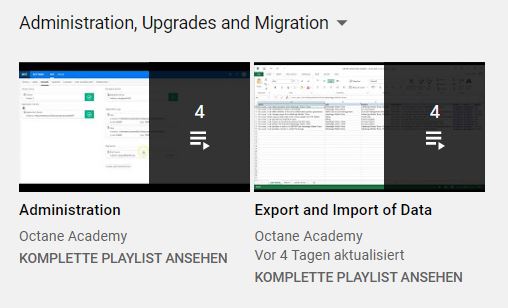
The channel is structured by the following areas and containing playlists:
Getting Started – Main purpose of this area is to allow you an easy and smooth onboarding with ALM Octane features and functionality.
General Topics – this playlist focus on topics to ease your daily work with Octane covering navigations, favorites, modules, filter, sorting, tips and tricks.
Continuous Integration, Continuous Testing and Test Automation – Main purpose of this area is to provide step by step guidance to setup, integrate and execute pipelines in ALM Octane as well as integrate your favorite testing tools using TestRunners.
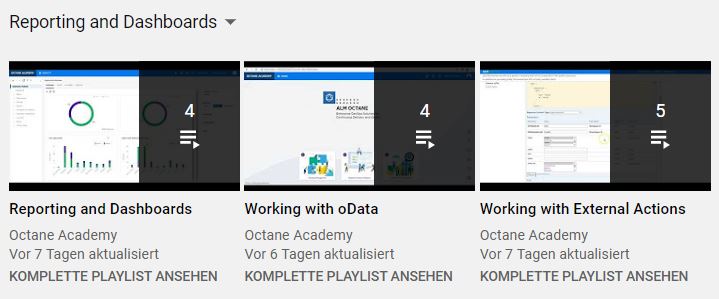
Reporting and Dashboards – Main purpose of this area is to help you understand and adopt all the reporting and dashboard capabilities ALM Octane provides.
Customization and Workflow – This area will help you to customize ALM Octane for your organization needs and give some real life example on workflow implementations.
RPA tools (Robotic Process Automation) are great solutions for automating boring, expensive, and repetitive workflows. RPA is designed to follow a pattern of user interactions and can free up valuable human resources by allowing software to perform repetitive tasks related to business processes. RPA tools provide the possibility for organizations to build a virtual workforce that works around the clock and continuously performs tasks without any human intervention.
Basically, RPA tools consist of 3 basic components: Designer, Orchestrator and Robot.
The Designer (also Studio) is used to create and design automated processes.
The Orchestrator is the brain of a RPA solution. It coordinates the execution of the automated processes based on user input or periodically. It also takes care about the management of the robots, which are part of the topology of an RPA platform.
The Robot are software robots which actually execute and run the automated process.
Common Misunderstanding
When we talk about integrating RPA into existing set of tools, we mostly refer to the workflows and processes we aim to automate using RPA. This usually starts by identifying the workflows and processes where high amount of human effort and time is involved by executing repeatable tasks. These tasks are mostly performed on the frontend of a software, such as SAP, Outlook, Microsoft Dynamics, Salesforce, etc. This kind of integration is referring to the recognition capabilities of an RPA tool and not of being integration into an existing tool set.
The Need to integrate
Let us assume, we have an ITSM process, where employee open an internal ticket or service request when they need to order a new phone, laptop or any other asset required to do the job. Today this is completely manual. Once ticket is created and approved, someone need to place an order of the asset and interact manually with the ordering system. In order to integrate and benefit from RPA, the ITSM tool should be able to execute an automated Bot from the RPA platform as part of the ITSM workflow.
Once RPA is integrated into an ITSM workflow, the user will need to submit the ordering request/ticket. Once request/ticket is accepted, the manager / approver will approve or decline the request. If request is declined, ticket is updated as usual as part of the ITSM workflow. In case of approval, RPA bot(s) will be triggered, which will extract the employee information from the ITSM ticket such as job level, location & cost center and order the asset required by the employee. This will consist activities to login to the asset ordering tool place the order based on the job level of employee. Once order is placed, the billing need to be mapped to the correct cost location, as well as the correct employee location need to be added as delivery address. Once completed, a confirmation email is sent to the employee and his manager. After this the ITSM workflow is set to the next phase.
RPA is not only for business (users)
To integrate fully automated bot(s) as part of your existing tool chain, it should be possible to access and execute the bots using open interface (such as REST API, SDK, etc.) on the RPA platform (usually on the orchestrator). This is crucial to be able to integrate and scale RPA within an organization. When RPA tools are evaluated and implemented, they are not integrated in any of the existing tool chains, such as ITSM, DevOps, IT Operations, Asset Management, Development Eco System, etc. This is a mistake as RPA implementation gain on maturity, this aspect become more important to the overall automation initiatives.
RPA at enterprise level
On long term, RPA will not only be used to automate business processes and increase productivity — on the contrary: Existing tool chains will require the need to integrate and consume their own bots as part of accelerating automation and improvement. Therefor a cross consumption is unavoidable.
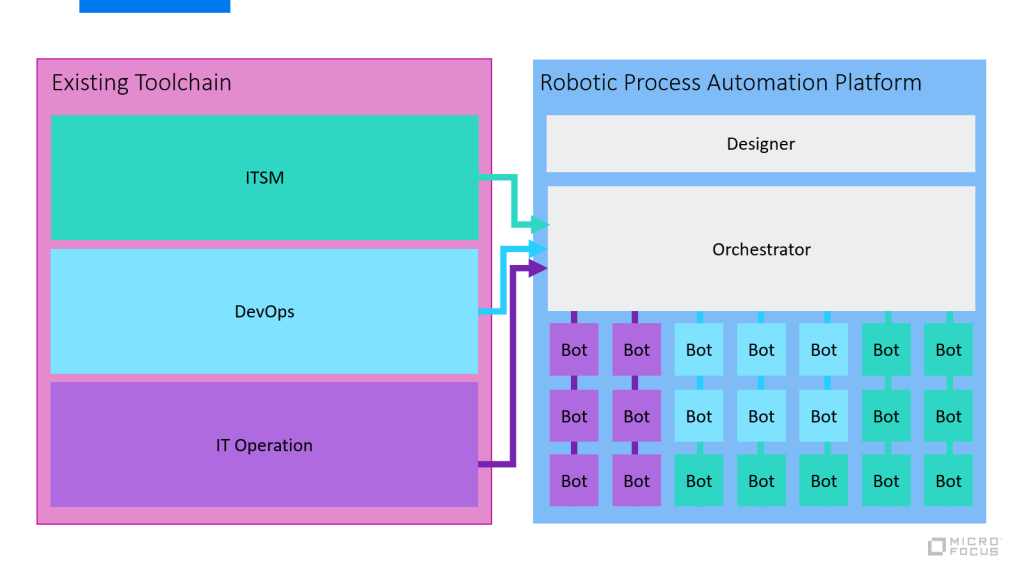
The following diagram shows an example how RPA evolves and integrates into the different tool chains.
For example, ITSM processes will manage, consume and integrate their bots into the ITSM workflow as needed, same goes for DevOps (preparation and post activities), IT Operations, Business, CRM, etc.
This allows a flexible consumption of RPA across department and teams and will not be isolated anymore. Share, reuse and collaboration will increase to productivity for RPA and build a automation community within an organization to support all aspects of automation (Testautomation, RPA, Service, IT Process, etc.).
Conclusion
The reason many organizations are failing adopting RPA solution is the fact that often it is evaluated as a point solution focusing on automation aspects only. When it comes to scaling bots by integrating into existing tool sets, it starts to get complicated as initial evaluation were made for a specific department and not completely validate for the enterprise need.
Micro Focus Robotic Process Automation gives you the power to build, secure, and scale automated processes, from legacy to modern, across the enterprise. Combining UI and API operations to centrally orchestrate the work of robots, Micro Focus RPA liberates human brainpower and ignites enterprise productivity. It provides an open REST API to integrate automated bots into your existing tool chain, independently from the tool sets in place.
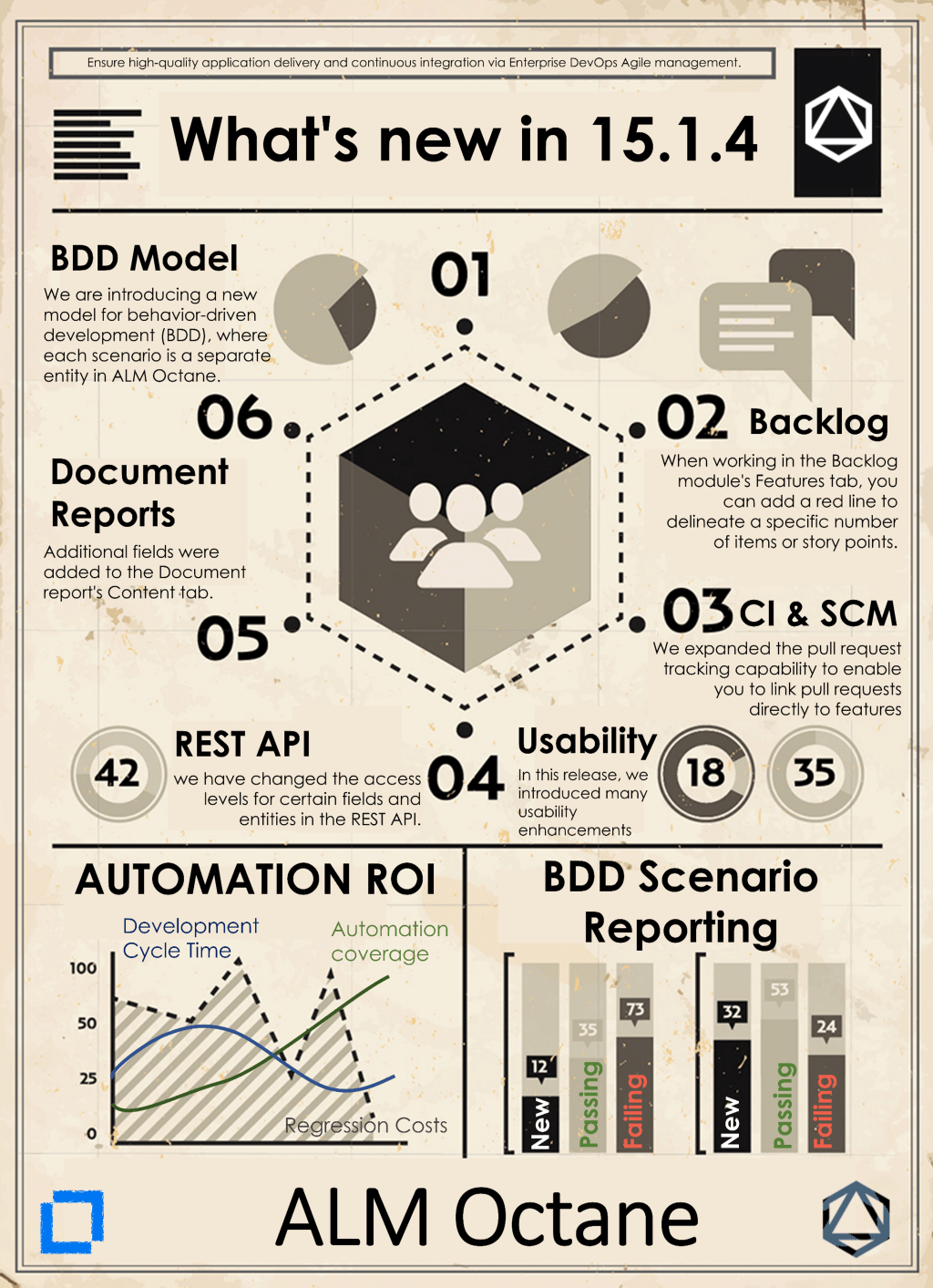
+++ #RELEASE#ALERT +++ ALM Octane 15.1.4. has been released on Micro Focus #SaaS. This is release brings lots of new features, enhancements and customer requests build in to the package. For all Micro Focus SaaS customers the release 15.1.4. is immediately available on their SaaS tenant.
















 Embrace-DevOps